

A good gym waitlist does one job: when someone cancels, the next member in line gets the spot before the class starts, and nobody has to argue about fairness. That takes four decisions made in advance: how many spots a class really has, how the line moves, how members are told, and which numbers you check each month. Get those right and a full 6 a.m. class stops being a front-desk headache. If your scheduling, billing and check-in live in one system, as they do in VO2WOD, the waitlist rests on the same attendance data you already collect.
TL;DR
- Set capacity by the coaching ratio and floor space you can actually deliver, then use check-in data, not gut feel, to see which classes run full.
- Use a first-come, first-served line with automatic promotion and a clear cutoff time after which the line stops moving.
- Notify members by push or text with a short claim window so a freed spot is not wasted.
- Pair the waitlist with a late-cancel policy, because the waitlist only works if cancellations come early.
- Review fill rate, waitlist-to-attendance conversion and no-show rate monthly, and change the schedule when the same classes stay full.
Table of Contents
- What a waitlist is for (and what it is not)
- Step 1: Set the capacity before you open a line
- Step 2: Choose how the line moves
- Step 3: Tell members quickly, in the channel they read
- Step 4: Fix the cancellations that feed the waitlist
- Step 5: Measure whether the process works
- Special cases to plan for
- Why one system beats stitching tools together
- Moving to VO2WOD
- FAQ
- Sources
What a waitlist is for (and what it is not)
A waitlist is a standby line for a class that has reached its cap. Members who miss out join it, and if someone cancels, the next person is moved into the class. That is all. It is not a way to oversell a class, and it is not a replacement for a schedule that fits demand.
For a functional fitness gym the stakes are practical. Classes run on a fixed coach-to-athlete ratio, equipment is limited (a rack, a rower, a barbell each), and the 5:30 a.m. and 5:30 p.m. slots carry most of your demand. A lost spot at those times is revenue and a member experience you do not get back.
The waitlist also tells you something a booking page cannot: how many people wanted a spot and did not get one. That is unmet demand, and it is the best input you have for your next schedule change.
Step 1: Set the capacity before you open a line
A waitlist only makes sense once the cap is honest. Set it per class type, not one number for the whole gym.
- Start from the coaching ratio. Decide how many athletes one coach can cue well in a given format. A technical Olympic lifting session needs a lower cap than a conditioning class.
- Count equipment and floor space. If you have 12 rowers and 20 athletes in a partner workout, the cap is a problem you created. Cap at what the room supports.
- Leave nothing to memory. Put the cap into the schedule itself so the booking system enforces it.
For a deeper look at how many spots a class needs to cover its costs, see our guide on break-even class capacity planning.
Use attendance data to find the classes that are really full
The phrase "mornings and evenings are busy" is not a plan. A simple heat map does better: put the day of the week across the top and the hour of the day down the side, and fill each cell with average attendance. A peak-hour guide recommends this approach for any gym with key fob or card check-in, since that check-in log is already your baseline data.
In VO2WOD, check-in runs through a QR code or wristband, so every visit is logged without anyone typing it in. Pull a few months of those check-ins and the heat map nearly builds itself. Look for three patterns:
- Chronically full (attendance at or near cap, with a waitlist most days): a candidate for a second session or a higher cap if the room allows.
- Full only sometimes (Monday and Tuesday evenings, for example): keep the schedule and let the waitlist absorb the swings.
- Chronically thin: consider merging, renaming or moving the class. Our post on class naming templates for functional gyms covers how a clearer name can change booking behavior.
Step 2: Choose how the line moves
There are two sensible ways to run a line, and you should pick one and apply it to every class.
| Approach | How it works | Best for |
|---|---|---|
| Automatic promotion | The next member on the list is moved into the class the moment a spot opens and is notified | Busy classes where cancellations happen close to start time |
| Offer and claim | Everyone on the list is told a spot is open and the first to accept gets it | Small gyms that want members to confirm they can still make it |
Automatic promotion is faster and fairer to the person who waited longest, because there is no race. The trade-off is that a member may be promoted while away from their phone, so pair it with a clear late-cancel rule (see Step 4). Offer and claim suits situations where you do not want members surprised by a booking.
Whichever you choose, keep these rules visible on your booking page:
- Order. Strictly first on the list, first in. No coach overrides for favorites, because one exception costs you the trust of everyone in line.
- List length. Cap the waitlist at a number you can plausibly fill, often a handful of names. A 30-person waitlist for a 12-person class promises something you cannot deliver.
- Cutoff. Decide when promotion stops. Many gyms stop moving the line a short time before class so members are not pulled in with no time to arrive. Whatever window you pick, state it in your policy.
- Membership limits. If a member is on a plan with a class limit, say whether a waitlist promotion counts against it.
Write these down once. Our class reservation policy template gives you wording you can adapt, and the guide to class reservations, rules and windows explains how to set booking windows that fit the line.
Step 3: Tell members quickly, in the channel they read
A freed spot has a short shelf life. If the notification arrives after the class started, you have changed nothing. Three habits help:
- Use a channel members open within minutes. In-app messages and push notifications beat email for same-day spots. VO2WOD includes in-app messaging, so the message sits next to the member's schedule.
- Say exactly what happened and what to do. "A spot opened in Thursday's 6:00 a.m. class. You are in. Cancel by 9 p.m. tonight if you can't make it" leaves no questions.
- Set a claim window if you use offer and claim. A short window keeps the next person in line from waiting for someone who never answers.
Send reminders on the same logic. Members who are reminded about a booked class cancel earlier or show up, and both help the line. Ready-made wording is in our class reminder templates.
Step 4: Fix the cancellations that feed the waitlist
A waitlist is only as good as the timing of cancellations. If most members cancel after the cutoff, or simply do not show, the line cannot help. That is why waitlist rules and your cancel policy belong in the same document.
Two levers do most of the work:
- A late-cancel window. Members cancel without penalty until a set time before class, giving the line time to move. After that, a fee or a lost class credit applies.
- A no-show consequence. A no-show uses up the spot the waitlist could have filled. A small, consistently applied penalty changes habits faster than a reminder poster.
Keep the tone friendly and the rule consistent. For tactics that reduce no-shows without annoying your regulars, read how to reduce class no-shows at your gym. Spots that go empty also hide a retention problem, which our piece on recovering hidden cancellations and fixing churn takes up.
Step 5: Measure whether the process works
Once a month, look at a short list of numbers. You do not need a dashboard full of charts.
| Metric | What it tells you | What to do with it |
|---|---|---|
| Fill rate by class and time slot | How close each class runs to its cap | Add sessions where it is near 100% for weeks |
| Waitlist size at class start | Unmet demand | A persistent line means a new class or a higher cap |
| Waitlist conversion | Share of freed spots claimed by waitlisted members | Low conversion points to slow or ignored notifications |
| No-show rate | Spots lost after booking | Tighten the late-cancel rule or reminders |
| Late-cancel share | Cancellations too close to start to refill | Move the cutoff or the cancel window |
Read the numbers together. A class with a long waitlist and a high no-show rate does not need a new session first: it needs a better cancel rule. A class with a long waitlist and low no-shows is the clearest case for adding capacity.
A worked example
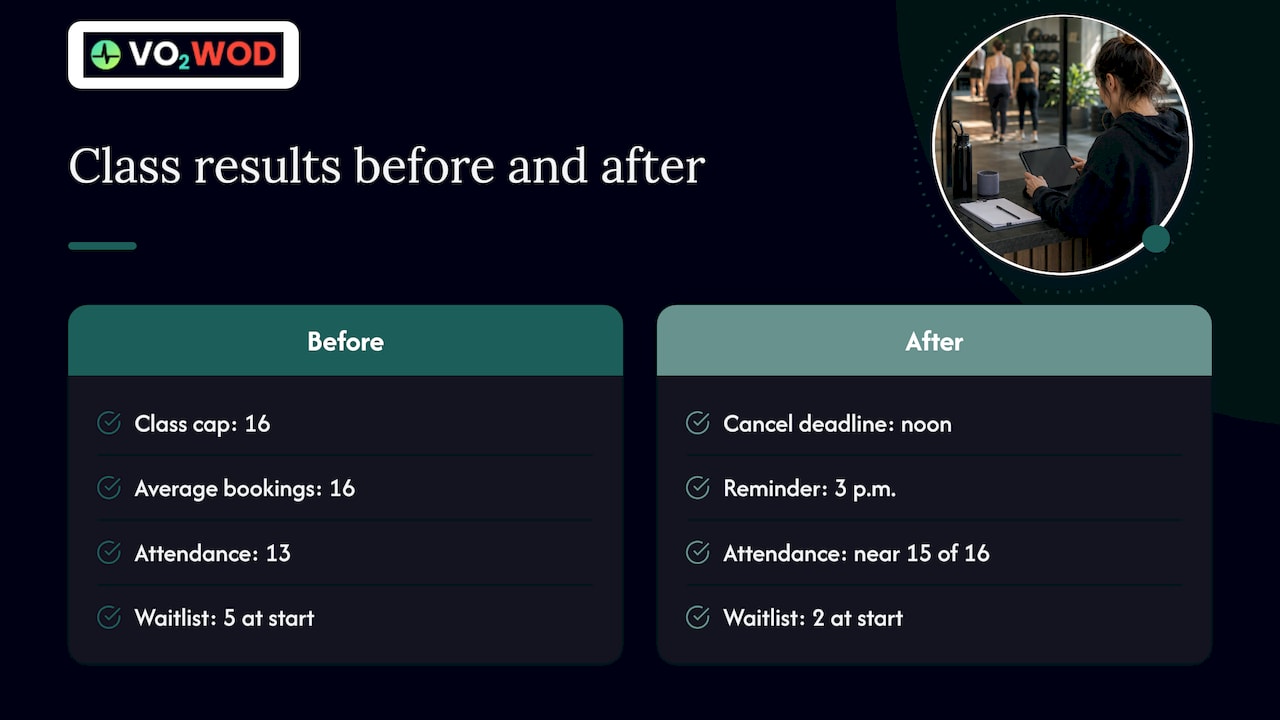
Say your Tuesday 6 p.m. class has a cap of 16. Over a month it averages 16 booked, but only 13 show up, and 5 people are on the waitlist at class start. Three empty spots and five people who wanted in is a rule problem, not a capacity problem.
You move the cancel window so members must cancel by noon, and you start sending a reminder at 3 p.m. Now cancellations arrive while the line can still move, and the waitlist fills spots before the class begins. After another month, attendance sits near 15 of 16 and the waitlist at start drops to two. If it stays at two or more for several weeks, that is your signal to open a second Tuesday session.
Special cases to plan for
Multiple locations. If members can book at more than one site, a full class at one location may have room at another. Setting that up is covered in our multi-location scheduling guide.
Calendar sync. Members who put classes on their phone calendar are more likely to arrive, and a promoted spot should land there too. See gym calendar sync approaches.
Drop-ins and leads. A first-time visitor who hits a full class may never come back. Answer quickly and offer the next open session; our conversion benchmarks and 5 minute response playbook shows how to handle those inquiries.
Why one system beats stitching tools together
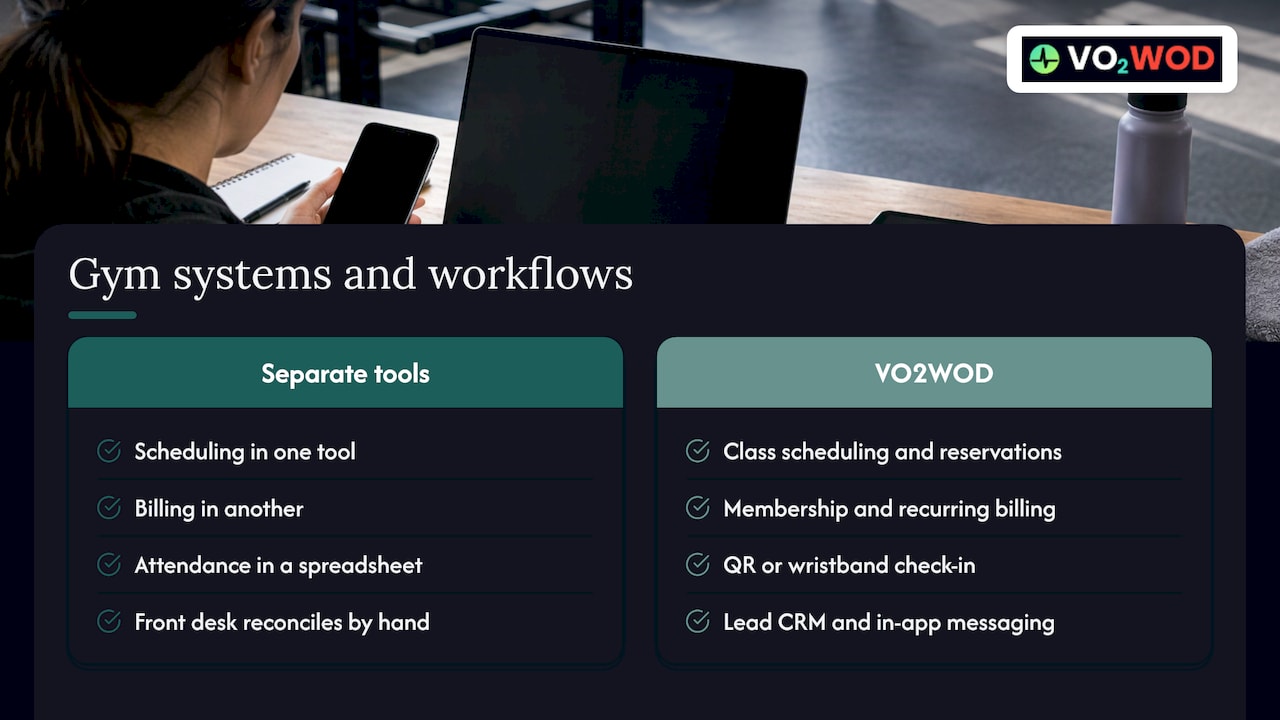
Waitlists get messy when scheduling lives in one tool, billing in another and attendance in a spreadsheet. A member promoted from the line needs to be checked against their plan, shown on the coach's roster and logged at check-in. When those are separate, someone at your front desk reconciles them by hand.
VO2WOD brings class scheduling and reservations, membership and recurring billing, QR or wristband check-in, lead CRM and in-app messaging into one platform, with live in-class heart rate tracking and automatic workout scoring on top. For a gym owner, that means the data behind your capacity decisions (who booked, who showed, who stayed away) comes from one place, and coaches see the same roster the front desk does.
Our view on waitlists is simple: they should be the least visible part of your gym. Members should book, get a spot or a place in line, and be told what happened without anyone at the front desk touching it. We build VO2WOD for functional fitness gyms because their classes are tight, their peak hours are crowded and their coaches want to coach, not reconcile spreadsheets. When scheduling, check-in and messaging share one record, a waitlist stops being a chore and becomes a read on demand. A line that keeps forming tells you what to add to your schedule, and attendance tells you whether members are staying. Gyms that treat the waitlist as data, not just a queue, make better schedule decisions.
Marcus
Moving to VO2WOD
If your current setup makes waitlists and capacity reporting harder than they should be, VO2WOD is built for functional fitness gyms, boutique studios and S&C facilities. We migrate your data for free, include one month of complimentary service, and a dedicated support team helps you through the transition. See VO2WOD or look at how it compares with other gym software.
Gyms that want in-class heart rate data on the floor can also look at Vo2hub group-fitness hardware.
FAQ
How long should a gym waitlist be?
Keep it to a number you could realistically fill, usually a few names per class. A very long list promises spots that will never open and frustrates members. If the line is regularly long, treat that as a sign to add a session.
When should the waitlist stop promoting members?
Set a cutoff a short time before class so members have time to arrive and your coach has a final roster. Choose a window that fits your location and member habits, then publish it in your reservation policy so everyone knows.
Should members be charged for late cancels from a waitlist spot?
Yes, apply the same rule to everyone. A member promoted from the line is a booked member, so the late-cancel window and no-show consequence should apply once they are in. State this clearly on the booking page.
How do I know if I need more classes or just better rules?
Look at the waitlist and no-show numbers together. A long line with many no-shows points to rules and reminders. A long line with high attendance and few cancellations points to adding capacity or a second session.