

Put the exercise type first, intensity second, then level or target audience, then duration, then any tags for equipment or scaling. That order lets a member decide in three seconds whether a class is for them, and it's why gyms that standardize on it see fewer front-desk questions and steadier attendance. Skip the order and clever names start working against you instead of for you.
TL;DR:
- Clear class names lead to fewer member questions, cancellations, and better attendance reports by communicating format, intensity, target audience, and duration upfront.
- Using a standardized order for class names—exercise type, intensity, level, and duration—improves scheduling consistency and easier member self-selection.
- Metadata tags for equipment, scaling, and format should be separate from the visible title, enabling automated filtering, reporting, and performance tracking.
- Pilot a new naming system in one slot for four weeks, monitor booking and cancellation data, and only then roll out schedule-wide improvements.
- Software built for structured class data simplifies implementation, reduces manual admin, and enhances insights through real performance metrics like heart rate zone tracking.
Table of Contents
- Why Class Naming Conventions Matter for Attendance and Retention
- The Core Framework: What Goes Into a Class Name and In What Order
- Ready-to-Use Class Name Templates and Common Pitfalls
- Setting Up Naming in Your Scheduling Software
- A Naming Governance Checklist and 4-Week Rollout
- What Actually Breaks When Gyms Skip This
- How VO2WOD Supports a Naming Standard Without the Admin Load
- Sources
Why Class Naming Conventions Matter for Attendance and Retention
A class name is the first filter a member uses to decide whether to show up. When it's vague or purely playful, that filter breaks, and the front desk absorbs the cost in repeated explanations and no-shows.
The IDEA Health & Fitness Association advises leading with the primary exercise type and stating intensity and target audience plainly, so members can self-select without asking staff to translate the title. That guidance also flags a real risk: catchy names that prioritize fun over clarity tend to increase front-desk friction rather than reduce it, because members show up guessing instead of knowing.
MOSSA's scheduling research makes a related point about the schedule itself. A purposeful schedule balances strength, cardio, and recovery in a predictable pattern, and consistent naming is what makes that pattern visible to members browsing a booking app. A schedule built around whatever slot an instructor wants, with names to match, is the opposite of purposeful.
The payoff shows up in numbers gyms already track:
- Fewer front-desk calls asking "what actually happens in this class"
- Lower last-minute cancellations from members who booked the wrong intensity
- Cleaner attendance reports because the same format is labeled the same way every week
- Easier marketing copy, since a consistent name doubles as a description
Pro Tip: If two staff members can't agree on what a class name means without checking the description, members can't either. That's your signal to rename it.
The Core Framework: What Goes Into a Class Name and In What Order
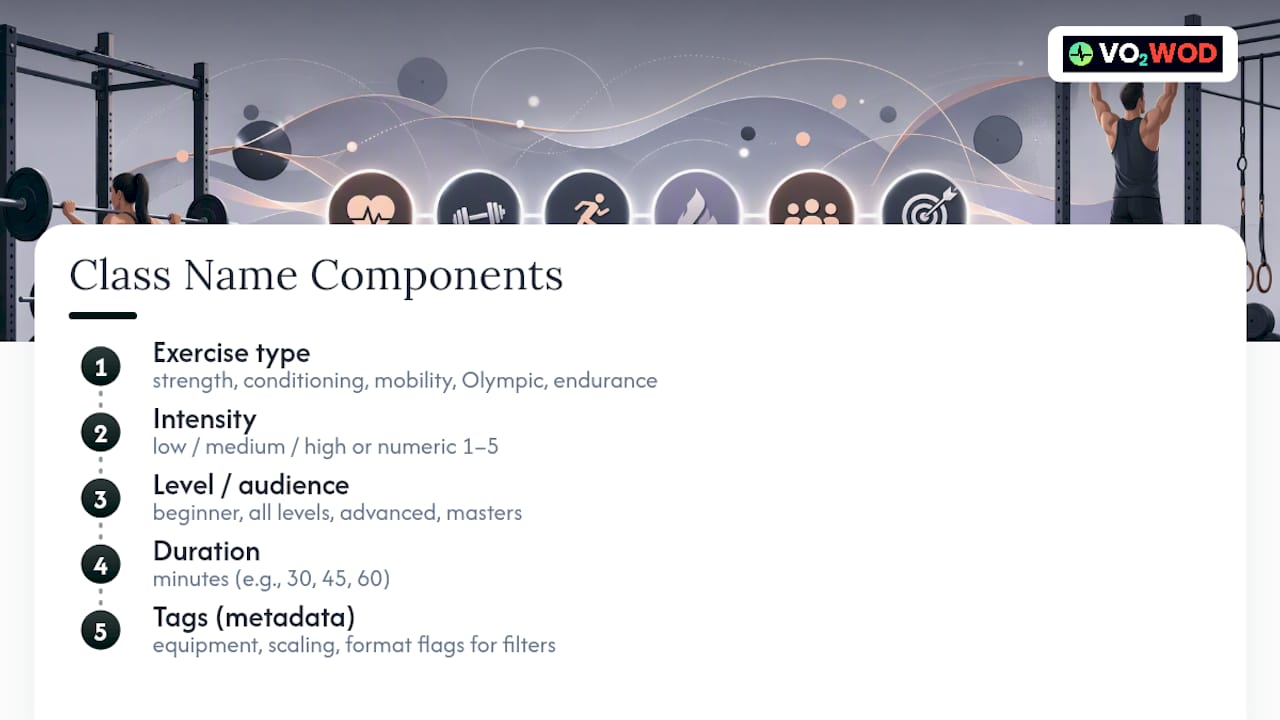
Every class name should carry four pieces of information, in this order: exercise type, intensity, level or target audience, and duration. Tags come after, as metadata rather than part of the title itself.
1. Primary exercise type. This is the format itself: strength, conditioning, mobility, Olympic lifting, endurance. It answers "what am I doing" before anything else, which matches the IDEA recommendation to lead with format rather than a brand flourish.
2. Intensity indicator. Keep it simple: low, medium, or high, or a numeric scale like 1 to 5 if your software supports it. Numeric scales work better across multiple locations because "medium" can mean different things to different coaches, while a 3 out of 5 is at least consistently ranked.
3. Level or target audience. Beginner, all levels, advanced, or a specific population like "new athletes" or "masters." This is where inclusive language matters most. Naming a class "Beast Mode" tells nobody whether they belong there, while "Strength, All Levels" does.
4. Duration. A 30-minute express class and a 60-minute full session are different commitments. Say so.
Tags sit outside the visible title but ride along in the metadata: equipment needed (barbell, rower, bodyweight only), scaling notes (Rx, scaled, partner), and format flags (competition prep, recovery day). These tags don't need to appear in the member-facing name, but they need to exist somewhere the software can read them, because that's what powers filters, waitlists, and reporting later.
Ready-to-Use Class Name Templates and Common Pitfalls
Here are templates built on the framework above, each with a quick note on when it fits:
- Strength, Medium, All Levels, 45 min — a standard strength day open to the whole membership.
- Conditioning, High, Advanced, 30 min — a short, intense session for experienced athletes only.
- Olympic Lifting, Medium, Beginner, 60 min (Coached) — technical work with extra coaching time built in.
- Endurance, Low, All Levels, 45 min — steady-state work that welcomes deconditioned members.
- Mobility & Recovery, Low, All Levels, 30 min — a recovery slot, clearly not a workout day.
- Conditioning, High, All Levels, 40 min (Partner) — team-based intensity work with the partner tag doing the work a cute name can't.
- Strength, High, Advanced, 60 min (Rx) — signals scaling expectations before anyone books.
- Hybrid Strength/Conditioning, Medium, All Levels, 50 min — a blended format named for what it actually contains.
On inclusive language, the ClassPass guidance on class naming warns against gendered or body-image language that can alienate members before they ever walk in. "Bikini Body Blast" excludes far more people than it attracts.
A few common fixes:
- Bad: "Beast Mode" → Better: "Conditioning, High, Advanced, 30 min"
- Bad: "Fit Chicks HIIT" → Better: "Conditioning, High, All Levels, 40 min"
- Bad: "Iron Warriors" → Better: "Strength, High, Advanced, 60 min (Rx)"
Setting Up Naming in Your Scheduling Software
The title a member sees and the data your software needs to run automations are two different things, and treating them as one is where most naming systems fall apart.
Build a canonical title field for the member-facing name, then add separate metadata fields: intensity level, class type, target audience, duration in minutes, and equipment or format tags. This mirrors how well-built gym platforms structure class data internally, keeping the title short while metadata fields carry the detail that filters, waitlists, and reports actually run on.
Those metadata tags do real operational work. A waitlist filter can automatically notify members who favor "high intensity" slots when one opens up. A reporting dashboard can group every "Strength, Medium" session across the week regardless of what day it ran, so you see format performance instead of just daily headcounts.
There's a performance layer here too. When a class is named and tagged consistently, in-class data becomes comparable across sessions. Wearable integration and automatic scoring, the kind VO2WOD offers through heart rate tracking, let a coach see whether a "Conditioning, High" class is actually producing high-intensity heart rate zones across the room, or whether the name is aspirational and the programming needs adjusting.
Pro Tip: Never let your title field double as your tag field. If "Rx" and "Partner" are typed into the class name itself, you lose the ability to filter, search, or report on them separately later.
A Naming Governance Checklist and 4-Week Rollout
Standardizing names is an operations project, not a branding exercise, so treat it like one:
- Assign one owner for the naming standard, usually the head coach or ops manager, with authority to approve any new class name.
- Write the standard down in a single shared document: the canonical order, approved intensity words or numeric scale, and the tag list.
- Brief front desk and coaches with a short script for members who ask why a familiar class has a new name.
- Pilot on one recurring slot for four weeks before touching the full schedule.
- Track bookings, check-ins, and cancellations on that slot weekly, the same measurement window MOSSA recommends for evaluating schedule changes.
- Scale to the rest of the week only after the pilot shows stable or improved fill rates.
What Actually Breaks When Gyms Skip This
The resistance is never really about naming. It's about the instructor who built "Beast Mode" three years ago and treats the name as their brand. That attachment is real, and dismissing it outright just breeds quiet non-compliance.

The fix isn't a mandate. It's picking one measurable slot, running the new naming convention there for a month, and putting the fill rate and cancellation numbers in front of the resistant coach. Numbers move people that memos don't. As Fitness GM points out, a clever label on a weak class doesn't fix bad economics, and a clear label on a strong one usually just makes the strength more visible.
Software that reduces the admin burden of tracking this, tagging classes, pulling attendance by format, matching heart rate data to named sessions, is what makes owners willing to run the pilot in the first place. Nobody standardizes forty class names manually in a spreadsheet twice.
— Marcus
How VO2WOD Supports a Naming Standard Without the Admin Load
Some gym management software is built for exactly the workflow this article describes: a clean title field paired with metadata tags for intensity, level, duration, and equipment, so your naming standard lives in the software instead of a document nobody opens.
Once classes carry consistent tags, reporting on fill rates and retention by format becomes a filter, not a spreadsheet project. Some gym software offers wearable integration and automatic scoring, covering Garmin, Apple, Fitbit, and Samsung, letting coaches check whether a "High Intensity" session is actually landing in the right heart rate zones, tying the name to real performance data instead of a guess. Some platforms offer data migration and support to handle the switch from your current system, and sometimes a complimentary service period to run your own naming pilot. If you're ready to see how VO2WOD's platform handles class metadata and reporting in practice, that's the place to start.
Sources
- How to Name Your Group Fitness Class - IDEA Health & Fitness Association
- Group Fitness Schedule: Purposeful or Pieced Together - MOSSA