

Make refunds rule-based: define who qualifies, calculate the amount with a fixed pro-rata formula, and run every request through a documented workflow in your gym management software. That's the whole operational rule. Everything else is detail.
Do these three things this week:
- Publish visible refund terms at checkout, not buried in a PDF nobody reads.
- Set one pro-rata formula (unused days divided by term days) and apply it every time.
- Build an intake workflow in your billing software so no refund happens over a front-desk conversation.
Studios that hide or inconsistently enforce their terms, rather than simply having them, are the ones that end up fighting chargebacks. Pull up a test member account in your billing system today and run a mock cancellation from request to refund. If any step requires guesswork, that's the gap to fix first.
Key Takeaways
A defensible gym refund policy combines written eligibility rules, a fixed pro-rata calculation, and a documented software workflow that produces evidence for every dispute.
| Point | Details |
|---|---|
| Publish visible terms | Post refund and cancellation rules at checkout, not just inside a signed contract members rarely reread. |
| Use one pro-rata formula | Calculate unused days divided by term days consistently, and state clearly whether frozen days count as used. |
| Check settlement status first | Confirm a payment shows as settled in your billing provider before attempting any refund action. |
| Log every goodwill exception | Record the reason for discretionary refunds so exceptions don't quietly become unwritten policy. |
| Centralize records in one system | VO2WOD keeps billing, freezes, and audit logs together, producing the documentation chargebacks require. |
Table of Contents
- What Should a Gym's Refund Policy Actually Cover?
- How Do Refunds Actually Move Through Your Software?
- What Refund Rule Applies to Each Common Request?
- How Should Staff Process a Refund Request Step by Step?
- What Records Do You Need for Chargebacks and Disputes?
- Sample Refund Policy Wording You Can Copy
- How VO2WOD Helps Owners Enforce the Policy They Wrote
- Ready to Test Your Refund Workflow?
- Sources
What Should a Gym's Refund Policy Actually Cover?
A refund policy gym owners can defend in a dispute needs five things written into the membership agreement, not implied. Skip one and you're negotiating case by case, which is where inconsistency and chargebacks come from.
- Scope. State exactly which products the policy covers: monthly memberships, class packs, drop-ins, and add-ons like personal training blocks. A ten-class pack and a recurring membership need different rules, and lumping them together is the single most common source of member confusion.
- Notice and effective date. Spell out how members must cancel (written notice, member portal, or in-person with a signed form) and when the cancellation takes effect. "Notice received by the 20th cancels the following billing cycle" is specific enough to enforce.
- Refund calculation. Use a pro-rata formula: unused days divided by total term days, multiplied by the amount paid. A member who pays $600 for 90 days and cancels after 30 used days is owed refund for the remaining 60 days. State whether frozen days count as used. The membership refund policy generator at AltFTool treats frozen days as suspended rather than consumed, and your own policy should say the same explicitly to avoid disputes.
- Exceptions. Medical issues, relocation, and gym closure each need their own clause with a required proof document (a doctor's note, a new lease, a closure notice). Ironclad membership contracts build in penalty-free termination for exactly these cases, paired with a written notice requirement that creates a paper trail if a member disputes the outcome later.
- Auto-renewal disclosure. Require a checkout acknowledgement (a checkbox, not fine print) confirming the member understands renewal terms and how to opt out. Auto-renewal rules vary by state and are still shifting at the federal level, so the safest move is over-disclosing rather than under-disclosing.
Pro Tip: Write the pro-rata formula into the contract using real numbers, not just the variable names. Members forgive a rule they can verify with a calculator; they fight a rule they have to trust you on.
How Do Refunds Actually Move Through Your Software?
The policy on paper and the refund your software will actually let you process are two different things, and the gap between them is where most staff frustration lives.
Before anything else, check the payment's status. Most billing platforms only allow a refund action once a charge shows as Settled. A pending or processing payment usually can't be refunded directly, only voided, and GymMaster's documentation walks through exactly where that status lives in the member's billing screen and when the refund button becomes available.
From there, you're choosing between three outcomes, and each behaves differently in your system:
- Cash refund, which returns money to the original payment method through your processor.
- Credit on account, which stays inside your software as a balance the member can apply to future billing.
- Reinstatement of sessions, which puts unused classes back into the member's package instead of moving money at all.
Booking platforms typically won't process a cash refund on their own. You issue it through the processor dashboard (Stripe or GoCardless, depending on your setup), then record that refund manually inside your booking software so the two systems stay in sync.
That distinction matters for your bottom line, too. Gymcatch's refund guidance notes that processors often don't return the original transaction fee to the merchant, so a $50 refund can still cost you the $1.50 to $2 you paid to collect it in the first place. If a member pays cash and you're refunding cash, log it manually in the system the same day so your account history doesn't show a phantom charge with no corresponding refund entry.
What Refund Rule Applies to Each Common Request?
Most refund requests fall into five predictable buckets. Deciding the default response for each one ahead of time is what keeps two front-desk staffers from giving two different answers to the same situation.
- Billing error (double charge, wrong plan billed): full refund immediately, no questions asked, with the error documented in the account notes.
- Service interruption or closure (a branch shuts down, equipment is out for weeks): pro-rata refund or credit for the unused portion of the term.
- Expired unused classes: default to a credit or session reinstatement, not an automatic cash refund. State this plainly in your policy so members know expired packs aren't refundable by default.
- Medical issue or relocation: handled as a contract exception, refund or termination granted once the required proof (medical note, new address) is on file.
- Goodwill request (no policy grounds, but you want to keep the relationship): manager discretion only, with the reason logged every time so the exception doesn't quietly become the rule.
That last category is the one that erodes consistency fastest if it isn't tracked. A goodwill refund with no log becomes the precedent the next member points to.
How Should Staff Process a Refund Request Step by Step?
A written workflow turns "ask the manager" into a repeatable process any staff member can run the same way twice.
- Intake. Require the request in writing (portal message or email) and confirm the requester's identity against the account on file.
- Verify status. Check the contract terms, any active freeze, and whether the original payment shows as settled in your billing provider.
- Calculate. Apply the pro-rata formula or package credit rule, noting any exception that changes the standard math.
- Execute. Process the refund in your billing system, or issue a credit or session reinstatement instead, depending on which the policy calls for.
- Update access. Adjust the CRM record and revoke check-in or booking access so no further charges draft against a cancelled account.
- Confirm and file. Send written confirmation to the member and retain every document. If a chargeback follows anyway, escalate it with that paper trail attached.
Pro Tip: Build this exact sequence as a checklist template inside your gym software, not a memory exercise for new hires. The gap between "we have a policy" and "the front desk applies it correctly" is almost always a missing checklist, not a missing rule.
What Records Do You Need for Chargebacks and Disputes?
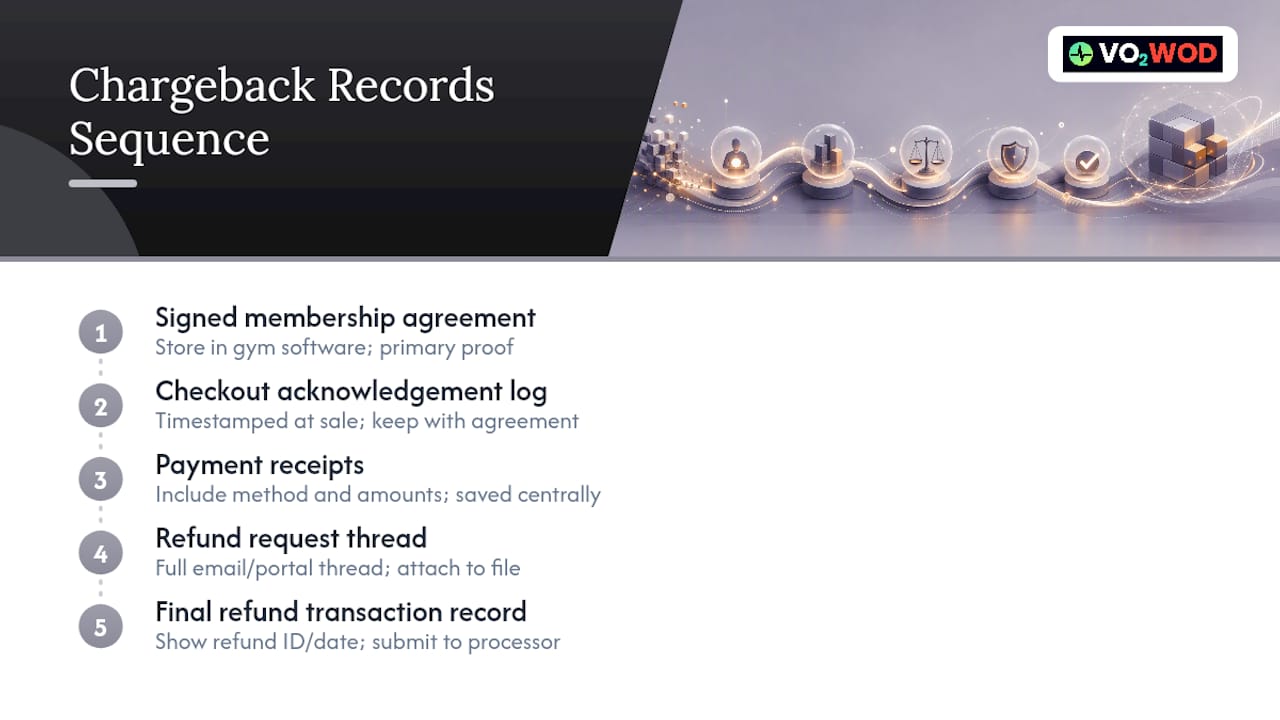
Keep the signed membership agreement, the checkout acknowledgement log, payment receipts, the full email or portal thread of the refund request, and the final refund transaction record. That five-piece file is what you hand to your processor when a chargeback lands.

Retain these for at least the length of your state's contract statute of limitations, stored inside your gym software rather than scattered across email folders. When a dispute arrives, pause any further collection attempts on that account, pull the documentation together, and submit it to your processor before their deadline. Hidden or inconsistently enforced terms, more than any single clause, are what turn a routine cancellation into a chargeback. If the paper trail is thin and the amount is small, a fast goodwill refund is often the cheaper outcome than fighting a dispute you can't fully document.
Sample Refund Policy Wording You Can Copy
Use these as starting clauses, then adjust the numbers to your own term lengths and state requirements.
- Pro-rata formula: "Refund amount equals (unused days ÷ total term days) × amount paid." Example: 60 unused days of a 90 day term on $600 paid returns $400.
- Freeze clause: "Membership freezes for verified medical reasons suspend the term; frozen days do not count as used in refund calculations."
- Checkout acknowledgement: "I acknowledge this membership renews automatically and understand how to cancel before the next billing date."
- Manager discretion: "Refunds outside stated policy terms require manager approval and a logged reason, recorded in the member account."
How VO2WOD Helps Owners Enforce the Policy They Wrote
A policy only works if your software can actually execute it. VO2WOD centralizes billing, class scheduling, freeze handling, and audit logs in one system, so a pro-rata calculation and the documentation behind it live in the same place instead of across three tools. Free data migration and a complimentary first month mean you can test that refund workflow, including a mock cancellation, before committing. Run one and confirm the export gives you what you'd actually need in a dispute.
— Marcus
Ready to Test Your Refund Workflow?
Spreadsheets and disconnected booking tools leave refund math and documentation scattered across three places, which is exactly where inconsistent enforcement creeps in. VO2WOD keeps billing, class freezes, and audit trails in one system, so a pro-rata refund and its paper trail sit together instead of living in separate tabs and email threads.

The free data migration and one month of complimentary service mean you can build and stress-test your refund workflow before your subscription starts. Owners weighing a switch from Wodify, PushPress, Mindbody, or similar platforms should ask for a demo that includes a live refund simulation, freeze handling walkthrough, and an audit log export. If the export gives you a defensible chargeback file in under a minute, you've found the system worth switching to. Book a demo and bring a real cancellation scenario to test.
Sources
- Ironclad Gym Membership Contracts: 2026 Owner’s Guide – Gym Membership Tips
- How do I refund or credit back a customer? | Gymcatch Knowledge Base
- They want their money back, now what? How to handle chargebacks in your fitness studio — Limitless Studio