

Announce the change clearly, lead with the exact amount and date, explain the value behind it, and get your team ready before the email sends. That order matters more than the wording. Tell customers what's changing (the number, the effective date, who's affected) in the first sentence, then explain what they're getting for it. Route your biggest accounts to a real conversation, not a mass email, and give everyone a way out: a downgrade, a pause, or a grandfathered rate for a defined window. None of this works if your support team finds out about the increase from an angry customer instead of from you. Brief customer success, sales, and billing first, hand them a script, and only then hit send.
TL;DR:
- The notice period should match customer contract types, with 30 days for monthly plans, 60 to 90 days for annual contracts, and 90 days or more for enterprise accounts.
- Communicate the price change through personalized channels for top accounts, followed by email and in-app notifications for smaller segments, ensuring notifications arrive before invoices.
- Prepare supporting materials such as scripts, FAQs, and concession rules before the announcement, and conduct dry runs with customer-facing teams to prevent surprises.
- Track churn, downgrades, and support tickets daily in the first week to catch issues early and prevent support overload or cancellations.
- Segment accounts by value and account health to design targeted outreach, reducing oversharing with small accounts and under-communication with high-value clients.
Table of Contents
- Building a Price Increase Communication Checklist Before You Announce
- How Much Notice Should You Give Before a Price Increase?
- What Should a Price Increase Announcement Say?
- Which Channels Should You Use to Announce a Price Increase?
- A Segmentation Matrix for Price Increase Rollouts
- Getting Your Team Ready Before Customers Hear the News
- Templates and Subject Lines You Can Adapt Today
- How to Handle Objections Without Undermining the Increase
- What KPIs to Watch After You Announce a Price Increase
- Applying This Playbook to a Gym Membership Price Increase
- A Note on Getting the Sequence Right
- How VO2WOD Simplifies a Gym Membership Price Change
- Key Takeaways
- Sources
Building a Price Increase Communication Checklist Before You Announce
Most price increases don't fail because of bad copy. They fail because someone in customer support gets blindsided by a Slack message from an angry client an hour after the email goes out. Run through this before you touch the send button.
- Audit every contract and notice clause. Pull your MSAs and check for required notice periods, auto-renewal triggers, and any locked-in rate language you might be violating.
- Lock your concession rules in writing. Decide what discounts, extensions, or grandfather periods reps can offer, and who has to approve anything beyond that, before a single customer asks.
- Build value recaps for your top accounts. Your biggest customers need a one-page summary of what they've gained, not a form letter.
- Schedule enablement sessions with role-play. Give reps a chance to practice the actual conversation, not just read a script silently.
- Draft your FAQ and landing page first. Customers will ask the same six questions. Have the answers live before the first email lands.
Skip any one of these and you're improvising in front of a customer who's already annoyed.
How Much Notice Should You Give Before a Price Increase?
Notice length isn't a courtesy. It's risk management, and the right window depends entirely on who you're notifying.
For monthly, self-serve subscribers, 30 days is the standard baseline. That's enough time for someone to evaluate the change without giving them so much runway that they simply forget and cancel out of confusion at renewal. For annual contracts, stretch that to 60 to 90 days. Annual customers have budget cycles, procurement reviews, and often a finance person who needs to approve the new number before renewal, so a tight window forces a rushed decision that tends to go against you. Enterprise accounts need 90 days or whatever their contract specifies, whichever is longer.
Before you pick any date, check three things:
- Your MSAs and renewal clauses. Some contracts specify exact notice periods or cap annual increases at a fixed percentage.
- Automatic-renewal regulations in your customers' jurisdictions. Several states have specific rules about how far in advance you must notify subscribers before an auto-renewing contract locks in a new price.
- Your fiscal and seasonal calendar. Avoid launching around major holidays, month-end closes, or right before your customers' own busy season. A price increase that lands during a client's Q4 crunch reads as tone-deaf even when the timing is a coincidence.
Sequence your outreach deliberately: contact strategic accounts first, in a live conversation, then move to broader tiers over the following days. Nobody in your top 10 accounts should hear about a rate change from a mass email.
What Should a Price Increase Announcement Say?
The structure matters more than the tone. A well-built message reduces confusion, and confusion is what drives the support tickets and cancellations that make an increase feel painful.
Your subject line should do three things in under eight words: state that it's a price update, give the effective date, and stay neutral. "Price update, effective March 1" beats anything cute or apologetic. Vague subject lines get ignored until the invoice hits, and that's the exact moment you don't want someone reading this for the first time.
The body needs to hit these points, in this order:
- The lead sentence states the change outright. Amount or percentage, effective date, who's affected. No warmup.
- The why comes next, and it has to be about value, not costs. Explaining the reasoning behind a price change measurably increases how well customers accept it, and framing it around what you've built (new features, better uptime, faster support) lands better than pointing at rising costs. "Adjusting for inflation" without specifics reads as an excuse, not a reason.
- What stays the same. Customers want to know their existing plan, data, and access aren't disappearing.
- Next steps, spelled out. How to accept (usually nothing required), how to downgrade, how to pause, and who to contact with questions.
- A named contact and a link to a real FAQ page. Not a generic support inbox. A person's name, or at minimum a specific team, builds more trust than "our team is here to help."
Pro Tip: Never open with "we're sorry to inform you." An apology implies the price is negotiable and invites every customer to ask for an exception. State the change, then explain the value, and skip the guilt.
Which Channels Should You Use to Announce a Price Increase?
The channel mix should mirror how much revenue and risk each account represents, and the order matters as much as the channel itself.
Strategic and contract accounts get a phone call first, followed by a written confirmation email that recaps what was discussed. This isn't just courtesy. It's how you keep control of the narrative before someone forwards a confusing email to their procurement team.
Mid-market accounts can work through a personalized email, ideally from an account manager, paired with an in-app notification so the message doesn't get buried in an inbox.
Self-serve and monthly customers get email, an in-app banner, and a line item on the billing statement itself. That third piece matters more than most teams realize. Coordinate the send order so the announcement always arrives before the invoice. A customer who sees a higher charge before they've seen an explanation assumes it's a billing error, and that assumption alone generates a support ticket you didn't need.
- Plan a reminder email roughly a week before the effective date for anyone who hasn't opened the first notice.
- Follow up with any account that opens the email but doesn't engage with the FAQ link within a few days.
A Segmentation Matrix for Price Increase Rollouts
Segmentation is where most price increases actually succeed or fail, not the writing. A tiered approach that matches notice length and outreach owner to account value prevents the two most common failure modes: over-communicating with low-value accounts and under-communicating with the ones that generate real revenue.
Build your matrix around three axes: contract type (annual vs. monthly), annual recurring revenue band, and account health score. Then assign rules per tier.
| Tier | Notice window | Channel | Concession ceiling | Owner |
|---|---|---|---|---|
| Strategic (top ARR band, at-risk or high-touch) | 90+ days | Call, then written confirmation | Up to full phase-in over 2 quarters | Account manager or CSM lead |
| Mid-market (mid ARR band) | 60 days | Personalized email + in-app | One-time 10% discount | CSM |
| Growth/SMB (lower ARR, monthly) | 30 days | Email + in-app + billing note | Downgrade or pause option only | Support/billing team |
| Trial or month-to-month | 30 days | Email + in-app banner | None beyond standard offers | Automated, flagged to CS if reply received |
Set escalation triggers before launch: a spike in support tickets from one tier, any mention of legal review, or a procurement contact entering the conversation should route immediately to a manager, not sit in a queue. Segmentation isn't about giving your biggest accounts better treatment out of fairness. It's about protecting the revenue that would actually hurt if it walked, while keeping smaller accounts moving through a process that doesn't require a human on every call.
Getting Your Team Ready Before Customers Hear the News
Your customer-facing teams need to know about the increase before customers do, and they need more than a heads-up email.
- Publish scripts and an internal objection FAQ first. Every rep should have the same answer to "why now" and "can I get an exception" before the first customer email sends.
- Run cross-functional dry runs by tier. Have CS, sales, and billing test the actual email sequence and talk through what happens when a strategic account calls in angry.
- Define concession authority explicitly and log every exception in your CRM. If a rep can offer a three-month discount without approval, write that down. If they can't, say so clearly, and give them an escalation path that takes minutes, not days.
- Set a manager escalation cadence for the first two weeks. Someone needs to be watching for patterns, not just individual complaints.
Sequencing failures, not weak writing, are what turn a routine price increase into a support fire. A perfectly worded email can't fix a rep who didn't know the increase was happening.
Templates and Subject Lines You Can Adapt Today
You don't need a finished letter for every tier. You need skeletons you can fill in fast.
- Subject line patterns: "Price update, effective [date]" or "[Plan name] pricing change starting [date]." Both state the fact upfront, which improves open rates and reduces the confused replies that come from vague subject lines like "Important account update."
- Strategic account skeleton: Call first. Follow with a short email: "Following our conversation, here's a written summary of the pricing change we discussed, effective [date], along with the options we agreed on."
- Mid-market skeleton: "Starting [date], your plan price will change to [amount]. Here's what that includes: [two or three specific value points]. You can [downgrade/adjust/contact us] by [date]."
- Self-serve skeleton: Short and direct. State the change, link to a full FAQ, and stop there. Nobody on a monthly plan wants three paragraphs.
- Landing page outline: Mirror the email exactly. Value recap first, then the specific change, then options (accept, downgrade, pause), then a contact method.
Avoid copy that hedges, like "we may need to adjust pricing soon." Vague language weakens your position before the conversation even starts.
How to Handle Objections Without Undermining the Increase
Every price increase generates pushback, and the accounts that push back hardest often aren't the ones you should worry about losing.
- Set concession ceilings with expiration dates before launch. A discount that never expires isn't a concession, it's a permanent price rollback in disguise.
- Trade concessions for something, not for nothing. Offer a phased rollout, a prepay discount for locking in a longer term, or an extended contract in exchange for a temporary reduced rate.
- Reframe the conversation around the account's value recap. A customer arguing about cost is usually really asking "what am I getting for this," and a specific answer moves the conversation faster than a discount does.
- Decide in advance which accounts you're willing to lose. Some customers cost more to retain at a discount than they generate in margin. Chargebee's research found roughly 58% of subscribers accept a price increase when the value is clearly explained, and offering a downgrade or pause option captures a meaningful share of the remainder who would otherwise cancel outright.
What KPIs to Watch After You Announce a Price Increase
The first two weeks tell you almost everything. Check churn, downgrade rate, and support ticket volume daily during week one, then shift to a weekly scorecard for the rest of the quarter.
- Immediate churn and downgrade rate, segmented by tier, so a spike in one segment doesn't get buried in an average.
- Acceptance rate on any offered alternative (pause, downgrade, phased plan).
- Support ticket volume, specifically tagged to the price change, as an early signal of confusion before it becomes cancellation.
- Net revenue retention, since the 58% baseline acceptance rate only holds when the messaging and options are executed well.
Route any ticket spike or unusual churn pattern straight to CS leadership and RevOps, not just the support queue. If downgrades in one tier cross a threshold you set in advance, that's your signal to revisit concession rules before the next batch of notices goes out.
Applying This Playbook to a Gym Membership Price Increase
A gym raising monthly dues faces the same sequencing problem as a SaaS company raising subscription fees, just with fewer contract lawyers involved. Segment by membership type: annual members get a personal note from the owner or head coach, monthly members get an email and an in-app notice, and trial members get simple, direct messaging with no negotiation offered.
The value recap for a fitness business writes itself if you're tracking the right things: better coaching attention, more consistent programming, and a clear record of each member's progress. Real-time performance tracking and automatic scoring, features VO2WOD builds specifically for functional fitness gyms, give owners concrete talking points instead of vague claims about "improved service."

A Note on Getting the Sequence Right
The sequencing rules in this playbook aren't theoretical. Businesses that brief their team before their customers, and segment outreach by account value, consistently see cleaner realization on price increases than businesses that rely on a well-written email alone. Copy matters. Order matters more.
— Marcus
How VO2WOD Simplifies a Gym Membership Price Change
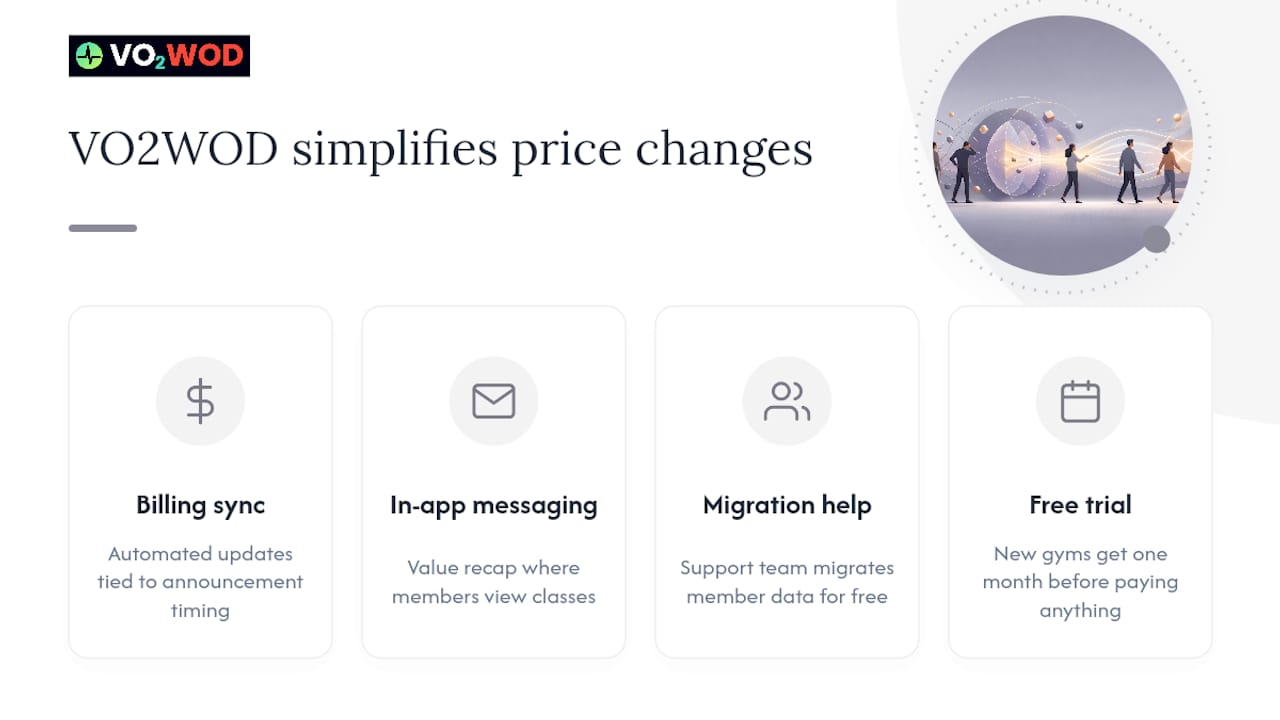
Raising membership dues gets messy fast when your billing, coaching staff, and member messaging all live in different systems. VO2WOD keeps them together: automated billing updates that sync with your announcement timing, in-app messaging so members see the value recap (coaching quality, program tracking, personal record history) right where they check their next class, and a support team that helps you migrate your existing member data for free. New gyms get a full month on the platform before paying anything, which gives you room to run the whole sequence, from enablement to announcement to monitoring, without adding software costs on top of a pricing change. If you're weighing whether your current system can actually support a clean rollout, compare your options on the VO2WOD alternatives page and reach out for a walkthrough of the migration process.
Key Takeaways
A price increase succeeds when the announcement leads with a clear number and date, explains value instead of costs, and reaches strategic accounts through a person before it reaches anyone through an inbox.
| Point | Details |
|---|---|
| Lead with the fact | State the exact amount, percentage, and effective date in the first sentence, not paragraph three. |
| Match notice to contract type | Give monthly customers around 30 days, annual customers 60 to 90 days, and enterprise accounts whatever their MSA requires. |
| Segment before you send | Route top accounts to a live call and confirmation letter, and self-serve customers to email and in-app notices. |
| Set concession rules first | Define ceilings, expiration dates, and approval paths before any rep talks to a customer. |
| Track early signals daily | Watch churn, downgrades, and support tickets daily in week one to catch problems before they compound. |
| Use the right tools for fitness gyms | VO2WOD supports segmented member messaging, billing coordination, and free migration to reduce friction during rollout. |
Sources
- If you're going to raise prices, tell customers why — HBR
- Price increase announcement: templates by segment (2026) — Swapbiswas
- The 58% rule: how to raise prices without losing subscribers — Chargebee
- Pricing communication best practices: keeping customers informed — Monetizely