

A member onboarding process is a structured 90-day sequence of touchpoints, milestones, and check-ins designed to get a new member to first value fast, then keep them engaged long enough to renew. The single highest-impact move you can make today: trigger a Day-0 welcome email with a 3-step quick-start checklist and clear login help. Everything else builds on whether that first message gets opened and acted on.
Before you touch your welcome sequence, confirm these three things are tracked from day one:
- Profile completion rate within the first 14 days
- Whether the member has used one core benefit (a class booked, a resource downloaded, a discount applied)
- Whether the member has made one connection (a mentor reply, a forum post, an event RSVP)
Get those three signals flowing and you already know more about retention risk than most program managers do at month three.
Key Takeaways
An effective member onboarding process combines a fast Day-0 welcome, a short activation checklist, and 90 days of milestone-based touchpoints tracked through leading and lagging indicators.
| Point | Details |
|---|---|
| Start with one action | Send a Day-0 welcome email with a 3-step checklist and login help within an hour of signup. |
| Follow the 3-3-6 cadence | Front-load three touches in week one, three more by week four, six across the remaining months. |
| Keep the checklist short | Limit first-session tasks to three to five items focused on profile and one core benefit. |
| Track both indicator types | Watch profile completion and email engagement early; confirm success with 90-day renewal rates. |
| Automate to stay consistent | Platforms like Vo2wod trigger milestone messages and track activity automatically, reducing manual follow-up gaps. |
Table of Contents
- Why the Member Onboarding Process Matters for Retention
- What Does a 90-Day Onboarding Timeline Look Like?
- How Should You Sequence Onboarding Emails and Messages?
- What Belongs on a Member Onboarding Checklist?
- How Do You Build Quick Social Wins Into Onboarding?
- Which Metrics Actually Predict Member Retention?
- How Can Automation Improve the Onboarding Experience?
- How Do You Improve Onboarding Once It's Live?
- How Software Can Shorten Time-to-First-Value
- What Privacy Rules Apply to Member Data Collection?
- A Practitioner's Note on Week One
- When It Makes Sense to Bring in Onboarding Software
- Where to Learn More
- Frequently Asked Questions
- Sources
Why the Member Onboarding Process Matters for Retention
Members who don't feel oriented within their first 90 days rarely stick around to renew. A structured 90-day onboarding program with milestones, checklists, and early feedback loops measurably increases both activation and renewal likelihood compared to a single welcome email and silence.
The business case is straightforward. Onboarding that works reduces support tickets because members aren't emailing to ask how to reset a password or find the event calendar. It increases advocacy because members who hit an early win talk about it. And it directly protects renewal revenue, since a member who never activates has no reason to pay again.
Only a minority of associations currently offer personalized onboarding, according to ASAE's research on new member engagement. That's a wide gap between what most organizations do and what actually moves the needle, and it means the bar for standing out is lower than you'd think.
Three signals matter more than any others in the first 90 days:
- Time-to-first-value: how many days until a member uses something tangible
- Profile completion: a proxy for whether the member sees themselves as "in" rather than just signed up
- Week-one activity: any login, click, or reply beyond the initial signup
Track those three and you have an early warning system for renewal risk months before the invoice goes out.
What Does a 90-Day Onboarding Timeline Look Like?
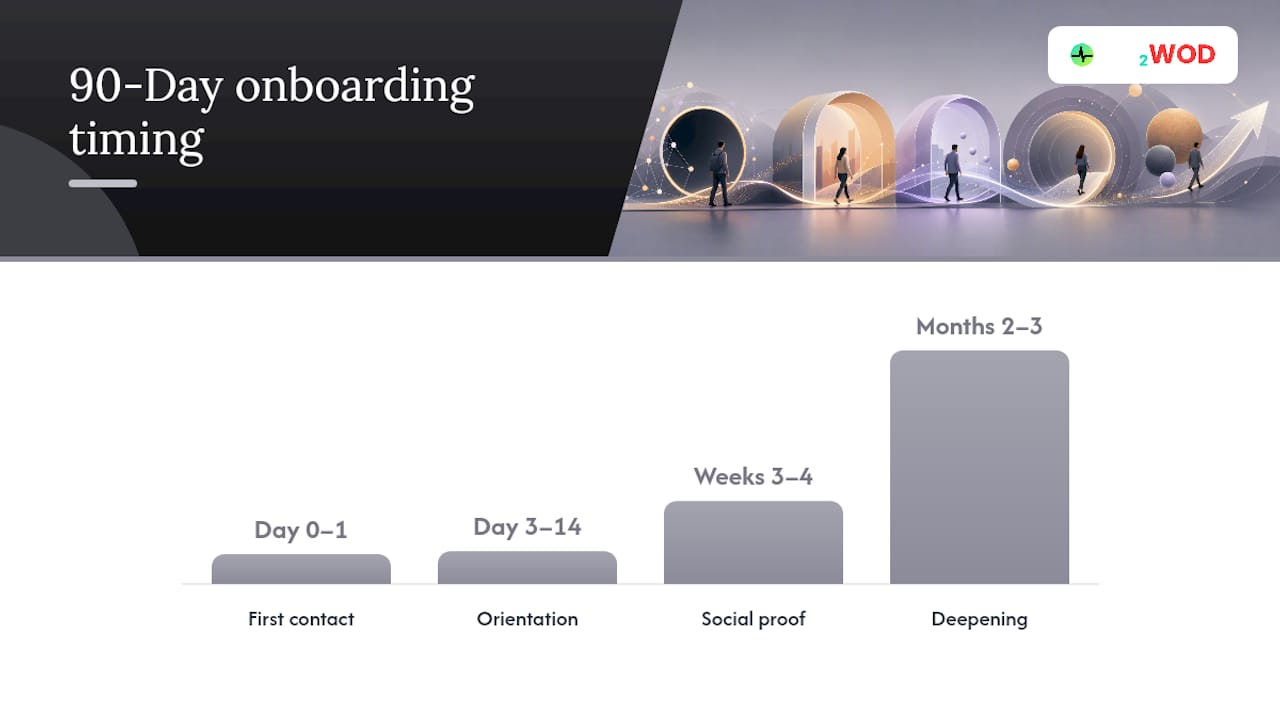
Here's a phased structure you can adapt to your association, gym, or membership program without reinventing the wheel.
1. Day 0 to Day 1: First contact Send the welcome email immediately, ideally within minutes of signup or check-in. Include a 3-step quick-start checklist, a link to a 2-minute portal walkthrough video, and a real staff name and email address, not a "no-reply" address. This is also when you set the tone: friendly, brief, and specific about what to do next.
2. Day 3 to Day 14: Feature spotlight and orientation Highlight one feature or benefit the member hasn't used yet. Invite them into a community space, whether that's a Slack channel, a forum, or a Facebook group. A short guided micro-orientation, five minutes or less, works better here than a dense help center article nobody reads.
3. Weeks 3 to 4: Social proof and first action This is where you send targeted event invitations based on the member's stated interests or signup source. Pair the member with a mentor or buddy if your program supports one. Push for one social action: a comment, a connection request, an RSVP.
4. Months 2 to 3: Deepening and check-ins Invite the member into a more advanced program or committee if relevant. Run a 30-day check-in (a short email, not a survey) and a 60-day check-in that asks directly whether they've found what they needed. At Day 90, send a recap of what they've done so far, paired with a short satisfaction survey.
| Phase | Timing | Primary goal | Key milestone to track |
|---|---|---|---|
| First contact | Day 0 to 1 | Deliver quick-start info | Welcome email opened, checklist started |
| Orientation | Day 3 to 14 | Build familiarity | Profile completed, one feature used |
| Social proof | Week 3 to 4 | Create connection | Event RSVP, mentor match made |
| Deepening | Month 2 to 3 | Confirm sustained value | 60-day check-in response, Day 90 survey completed |
Each milestone should map to something you can actually measure in your AMS or CRM, not just something that feels good to send. If a milestone doesn't have a corresponding data point, it's decoration.
Segment tuning matters here. A high-value corporate member or a gym member on an annual plan probably needs a faster, more personal Week 1 (a phone call, not just an email), while a low-touch individual membership can run almost entirely on automation. Adjust cadence and channel by segment rather than running one script for everyone. A member who joined through a referral, for instance, already trusts you more than a cold signup, so you can skip some of the trust-building steps and move faster to activation.
How Should You Sequence Onboarding Emails and Messages?
The most cited framework for early member communication is the 3-3-6 cadence: three touches in the first week, three more spread across weeks two through four, then six touches spaced out across the remaining two months of the 90-day window. ASAE recommends this approach specifically because it front-loads contact when a member's attention is highest, then tapers off before it becomes noise.
One rule that trips up a lot of teams: suppress unrelated marketing campaigns during those first weeks. A new member getting a renewal upsell in week two, before they've even logged in once, reads as tone-deaf.
Here's what each early touch should be doing:
- Day 0: Deliver the quick-start checklist and login help. Goal: reduce friction to first login.
- Day 3: Spotlight one feature. Goal: create a specific reason to come back.
- Week 2: Invite to an event or community space. Goal: create a social reason to engage.
- Day 30: Check in directly, ask if anything is unclear. Goal: catch friction before it becomes churn.
- Day 90: Send a recap plus a short survey. Goal: measure satisfaction and gather feedback for the next cohort.
Keep subject lines specific rather than clever. "Your 3 first steps" beats "Welcome aboard!" every time, because it tells the member exactly what they'll get by opening it. Calls to action should be singular: one button, one next step, not four competing links.
Short videos work well here too. Keep them between one and four minutes and use them to explain not just how to do something, but why you're asking for certain information. A brief note on why you collect profile data, for example, tends to increase completion rates rather than triggering suspicion.
Pro Tip: Add in-app messages or SMS only for time-sensitive nudges, like "Your event starts in 2 hours," not for anything you'd normally put in an email. Use conditional logic so a member who's already completed a step never gets reminded to do it again; nothing kills trust in an automated sequence faster than a message that ignores what you clearly already know.
What Belongs on a Member Onboarding Checklist?
Keep the first-session checklist to between three and five items. Research on onboarding checklists consistently finds that a focused list, especially one anchored around profile completion, drives measurably higher visibility and retention than a long list of "nice to have" tasks.
A workable version looks like this:
- Add a photo and short bio. This is the single strongest driver of a member feeling "in" rather than just registered.
- Use one core benefit. Book a class, download a resource, redeem a discount, whatever your program's central value is.
- Make one connection. Reply to a mentor, join a group, comment on a post.
- Bookmark the help center or support contact. So the next question doesn't turn into a support ticket or a lapsed membership.
Why so short? Every added field or task increases the odds a member abandons the session before finishing. Guidance on progressive profiling supports deferring anything nonessential, like detailed preferences or secondary contact info, to later sessions rather than front-loading it all.
Design the first session to finish in under 10 minutes. Anything longer and you're asking for abandonment.
| Checklist item | Why it matters |
|---|---|
| Photo and bio | Builds identity and community visibility |
| One core benefit used | Confirms the member found real value fast |
| One connection made | Creates a social reason to return |
| Help resource bookmarked | Reduces future support friction |
How Do You Build Quick Social Wins Into Onboarding?
Community is often the difference between a member who renews out of habit and one who renews because they'd miss the people. The fastest way to build that is a lightweight mentor or buddy system, not a formal program with heavy training requirements.
For high-value segments, like new committee members or larger corporate accounts, a short welcome call from a named staff member or veteran member goes a long way. It doesn't need to be long. Ten minutes is plenty if it ends with a specific next step.
A few tactics that work at almost any scale:
- Match new members to a buddy based on shared interest or geography rather than random assignment.
- Run a small, curated first-timer event, capped at a size where introductions are actually possible, with one clear outcome (meet three people, ask one question).
- Point new members directly to one relevant thread or contact in your community space instead of just linking the general forum and hoping they find their way.
- Follow up after the first event or call to confirm the connection actually landed.
The goal isn't volume. One real connection in the first month beats ten passive introductions nobody follows up on.
Which Metrics Actually Predict Member Retention?
Split your metrics into two categories: leading indicators that predict trouble early, and lagging indicators that confirm whether your program worked.
Leading indicators include welcome email open and click rates, profile completion within the first 14 days, first event registration, and checklist completion rate. These tell you where a cohort is heading while you still have time to intervene.
Lagging indicators include 90-day engagement scores, satisfaction (CSAT), Net Promoter Score, and year-one renewal rate for new members specifically, not your overall renewal rate, which gets diluted by long-tenured members.
| Metric type | Example metric | What it tells you |
|---|---|---|
| Leading | Profile completion by Day 14 | Early sign of activation risk |
| Leading | Checklist completion rate | Whether onboarding design is working |
| Lagging | 90-day engagement score | Whether the member found ongoing value |
| Lagging | Year-one renewal rate (new members) | Whether onboarding actually protects revenue |
Cohort comparisons matter more than single-point checks. Compare this quarter's new-member cohort against last quarter's on the same 14-day and 90-day markers, and set an alert threshold, say, no profile activity by Day 10, so staff can intervene with a personal outreach before the member drifts. Research on adoption dynamics in information systems backs this cohort-based approach: early usage patterns are a strong predictor of long-term engagement, which is exactly why leading indicators deserve as much attention as renewal numbers.
How Can Automation Improve the Onboarding Experience?
Your AMS or CRM should be doing more than storing contact records. The capabilities worth turning on: triggered sequences based on signup date, segmentation by member type or interest, automated mentor matching, and activity-based triggers that fire when a member hits (or misses) a milestone.
Conditional logic is where automation earns its keep. A member who hasn't logged in by Day 10 should get a different message than one who's already completed the full checklist, and a high-value member showing no activity should trigger a staff alert rather than another automated email. Suppress advanced program invitations for members who haven't finished basic onboarding; sending a committee invite to someone who hasn't logged in once is a mismatched signal.
- Trigger the welcome sequence off signup or first check-in, not a weekly batch send.
- Segment by acquisition source, membership tier, and stated interest at signup.
- Automate mentor matching based on shared criteria rather than manual pairing.
- Escalate low-activity, high-value accounts to a human, automatically.
Pro Tip: If your program has a mobile app component, keep first-login mobile onboarding shorter than the desktop version. Members abandon multi-step signup flows on a phone far more readily than on a laptop, so front-load only what's absolutely required to unlock first value.
How Do You Improve Onboarding Once It's Live?
Onboarding isn't a set-it-and-forget-it sequence. Build a short pulse survey into Day 7, Day 30, and Day 90, two to five questions, no more. Something like: "Did you find what you needed this week?" and "What's one thing that would have made this easier?"
Translate specific answers into specific fixes rather than general impressions. If several members mention confusion navigating the portal, that's a signal to add a 60-second tutorial video at that exact step, not to rewrite your entire welcome email.
A few things worth A/B testing early:
- Subject lines: specific and task-oriented versus friendly and vague.
- CTA placement: a single button near the top versus a list of links further down.
- Checklist length: three items versus five, tracked against completion rate.
Run each test for a full cohort cycle before drawing conclusions, since a single week of new signups is rarely representative.
How Software Can Shorten Time-to-First-Value
Some of the friction in onboarding isn't a communications problem, it's an operations problem: too much manual data entry, no visibility into who's actually engaging, and staff guessing which members need a nudge. This is where the right software closes the gap between a good plan and one that actually runs.

Platforms built for functional fitness gyms, for example, can guide a new member through their first login, track milestones automatically, and send in-app messages tied to real activity rather than a fixed calendar date. That shifts staff time away from manual tracking and toward the members who actually need a human touch.
Concrete proof points worth knowing about when evaluating this kind of support:
- Guided first login and onboarding walkthroughs built into the platform
- Free data migration when switching from another system
- A complimentary first month of service to test the transition
- Dedicated support during the switch, not just a help article
The core idea isn't to replace your onboarding plan with software. It's to use software as the implementer, the thing that actually fires the Day-3 message and flags the member who hasn't checked in by Day 10, so your 90-day plan runs consistently instead of depending on someone remembering to send it.
What Privacy Rules Apply to Member Data Collection?
Onboarding asks for more personal information than almost any other point in the membership relationship: names, contact details, payment info, sometimes health or biometric data if your program involves fitness tracking. That makes it the moment where privacy practices matter most.
Collect only what you need for the checklist and program to function, and say so plainly. If you're asking for a phone number, tell members it's for event reminders, not vague future use. This kind of transparency, explaining why you're collecting a field before you ask for it, tends to increase completion rates rather than triggering hesitation.
Store data with clear retention and access rules. Not every staff member needs to see every field a new member submits, and your AMS or CRM permissions should reflect that. If your onboarding process includes biometric data, such as heart rate tracking in a fitness setting, treat that data with the same or greater care as payment information, since health-adjacent data typically carries its own compliance expectations depending on your jurisdiction.
Give members a clear, easy path to update or delete their information later. A "start here" checklist item that says "review your privacy settings" costs almost nothing to add and builds real trust.
None of this is a substitute for reviewing the specific privacy laws that apply to your organization's location and membership base. Treat this section as a starting checklist for what to ask your legal counsel or compliance team, not as the final answer.
A Practitioner's Note on Week One
Get the Day-0 email out fast, keep the checklist to three items, and call your highest-value new members personally in week one. The lesson that holds up every time: momentum built in week one rarely gets rebuilt later. Week-one checklist: welcome email sent within an hour, one benefit used, one connection made.
When It Makes Sense to Bring in Onboarding Software
Everything in this guide can run on spreadsheets, a shared inbox, and a lot of staff discipline. Plenty of small membership programs do exactly that, and it works until volume outgrows manual tracking. The moment you're guessing which members have actually logged in, or a coach is manually re-entering workout data that should trigger an automated milestone message, that's the signal to bring in software built for this.
Vo2wod is built specifically for functional fitness gyms and handles the operational side of onboarding: automatic workout scoring, real-time performance tracking through heart rate monitoring, and in-app milestone messaging that fires based on actual member activity instead of a fixed date on a calendar. If you're currently on another platform, free data migration and a complimentary first month make switching low-risk while you test whether it fits your program. Compare what you're using now against the full feature set and see whether automated activity tracking would free up the staff time your 90-day plan actually needs to run well. Book a walkthrough to see how a first login and welcome sequence would look for your gym.
Where to Learn More
- ASAE's guide to onboarding strategy for association-specific tactics
- Practical email and checklist templates ready to adapt
- Warm, human-centered onboarding approaches for client-facing programs
- Adoption dynamics research behind cohort-based measurement
Frequently Asked Questions
What is the ideal length for a member onboarding process? Ninety days is the standard window most association and membership research points to, broken into first contact, orientation, social proof, and deepening phases.
How many emails should a new member onboarding sequence include? The 3-3-6 cadence works well: three emails in week one, three more across weeks two through four, and six spaced across the remaining two months.
What's the single most important item on a member onboarding checklist? Profile completion, particularly adding a photo and bio, correlates most strongly with a member feeling integrated rather than just registered.
Should onboarding differ by member segment? Yes. High-value or high-touch segments benefit from a personal call in week one, while lower-touch individual memberships can run almost entirely on automated sequences.
What metrics show onboarding is working? Watch profile completion by Day 14 and checklist completion rate as early signals, then confirm results with 90-day engagement scores and year-one renewal rates for new members specifically.
Sources
- Start Strong: Five Onboarding Strategies to Set Your New Members Up for Success
- Association onboarding best practices
- The Perfect Member Onboarding: Email Templates and Checklists
- Information Systems Research article (adoption dynamics)