
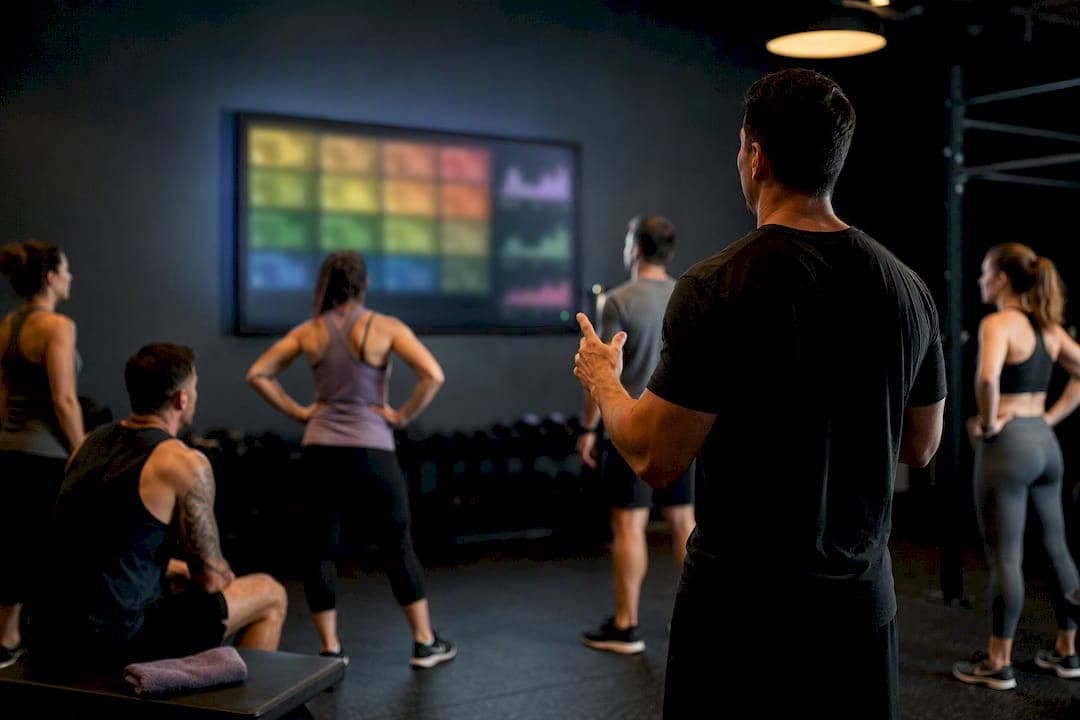
You need three things to display heart rate on TV for a full class: wearable sensors on each athlete, an aggregator or receiver that pulls those signals together, and display software that pushes the result to a screen. An integrated system bundles all three into one setup. Start with an opt-in pilot of one class before rolling it out gym-wide.
TL;DR:
- Using an integrated system like VO2WOD simplifies setup by combining sensors, hardware, and display software into one platform, reducing failure points.
- For classes over 18 participants, displays automatically page through tiles, so plan class size and paging speed accordingly.
- Core equipment includes a large, visible TV or projector, wearable sensors, a tested display app, and confirmed Wi-Fi and Bluetooth coverage in the training space.
- Opt-in leaderboards with anonymity options help maintain trust, with transparency at sign-up to encourage member participation.
- Chest straps offer the best accuracy for high-motion exercises, while armbands and wrist sensors provide a comfort-accuracy balance, each with specific hardware management tips.
Table of Contents
- How to Display Heart Rate on TV: A Pre-Class Checklist
- Step-by-Step: Pairing Sensors and Routing Data to the TV
- Which Display Formats Actually Help Coaches Cue Better
- Chest Strap, Armband, or Wrist Optical: What Fits Your Class
- Fixing Bluetooth Dropout and Scaling Past One TV
- Privacy and Consent: What to Tell Members Before You Show Their Heart Rate
- Why an Integrated Platform Removes the Guesswork
- What I Learned Rolling Out Live Displays the Hard Way
- Ready to Try Live Class Displays? Start With VO2WOD
- Sources
- FAQ
How to Display Heart Rate on TV: A Pre-Class Checklist
Before you touch a single strap, confirm the basics. A 55 inch screen or larger works for most box layouts; mount it where every rig has a sightline, not just the front row. Decide how the signal gets to the screen: HDMI from a laptop or mini PC, AirPlay or Chromecast from a tablet, or a dedicated studio receiver with its own HDMI output.
- TV or projector sized and placed for full room visibility, with a backup HDMI cable on hand
- Wearable mix confirmed: chest straps for accuracy, armbands or wrist optical for member-owned devices
- Display app installed and tested on the aggregator device (tablet, laptop, or receiver)
- Wi-Fi and Bluetooth coverage checked in the actual training space, not just the office
- A five-minute connectivity test run before the first live class
Skelcore's guidance on integrating heart-rate monitoring into group classes makes a point worth repeating: the goal is low device friction so members spend class time training, not fumbling with a strap.
Step-by-Step: Pairing Sensors and Routing Data to the TV
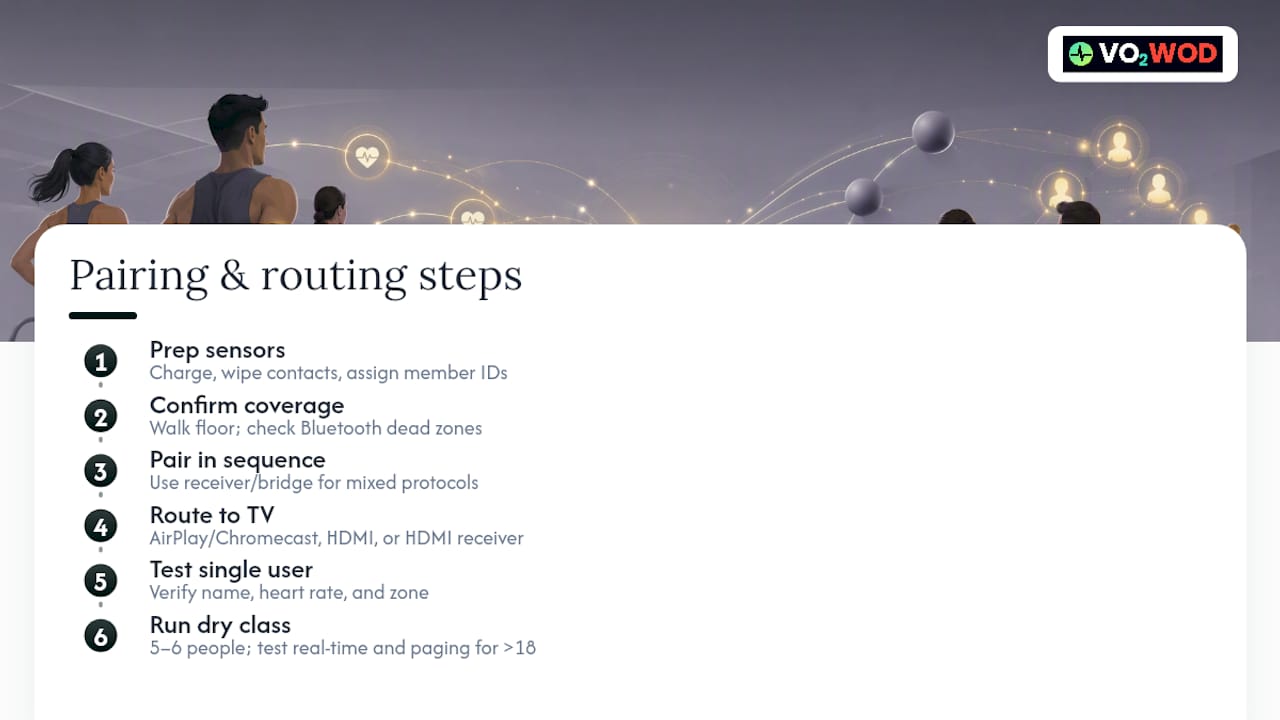
1. Prep sensors before members arrive. Charge every chest strap and armband, wipe contact points, and load fresh coin cells for anything running low. Assign each device to a member profile, or use temporary IDs for drop-ins and trial members.
2. Confirm radio coverage. Walk the training floor with a phone or tablet to check Bluetooth signal strength. Dead zones near metal racks or thick walls are common in converted warehouse spaces.
3. Pair devices in sequence. Start with a studio receiver or bridging device if you have mixed protocols. A dedicated receiver picks up Bluetooth and ANT+ simultaneously, which avoids the one-by-one pairing that eats into class time when everyone's using a different watch brand.
4. Route the feed to the TV. Three paths work: AirPlay or Chromecast from a tablet running the display app, HDMI straight from a laptop or mini PC, or a receiver with native HDMI output that skips the extra device entirely.
5. Test with a single user first. Confirm the name, heart rate, and zone show correctly before adding the rest of the class.
6. Run a full dry class. Bring in five or six people and check that the display updates in real time and handles disconnects gracefully.
For classes over 18 people, expect the display to page through participants rather than cram everyone onto one screen. Some studio systems cap a single screen at 18 tiles arranged three rows by six, paging automatically once more athletes connect. Plan tile size and paging speed around your largest class, not your average one.
Pro Tip: Run your pilot class on a Tuesday, not a Monday. Monday classes run heavier and hide connectivity hiccups in the noise of a busy room; a mid-week class gives you a cleaner read on whether pairing actually holds up.
Which Display Formats Actually Help Coaches Cue Better
Color-coded zones beat raw numbers for at-a-glance coaching. A member glancing up mid-interval doesn't need to do math on "162 bpm." They need to see red, orange, or green and adjust.
- Color-coded zone bands (usually five zones) as the primary visual
- Simple tiles showing name, current heart rate, and zone color, nothing more cluttered
- One class-level intensity graph if your software supports it, useful for cool-down pacing
- Large, high-contrast fonts readable from the back of the room, with anti-glare screen placement away from windows
Keep it simple. Studio displays that stick to a single clear visual let coaches cue effectively instead of narrating a dashboard, a point Skelcore's implementation guide makes directly. During warm-up, cue members toward zone 2. During intervals, call out who's holding zone 4 or 5. During cool-down, watch for the room dropping back to zone 1 as a class-wide signal to move on.
Leaderboards work, but only as opt-in. Not every member wants their effort ranked publicly, and forcing it alienates exactly the people you're trying to retain. Offer a toggle: full name and rank, initials only, or off the board entirely.
Chest Strap, Armband, or Wrist Optical: What Fits Your Class
Chest straps remain the most reliable option for high-motion interval work. Wrist optical sensors lose signal during burpees, wall balls, and anything involving grip and impact, because the sensor needs steady skin contact to read blood flow accurately.
Armbands split the difference, comfortable enough for longer sessions and more stable than wrist sensors during movement. Member-owned devices, whether an Apple Watch or a Garmin, lower your hardware cost but introduce accuracy variance you can't fully control.
- Chest straps: best accuracy for burpees, rowing, and Olympic lifts
- Armbands: good comfort-to-accuracy balance for longer conditioning pieces
- Wrist optical (member-owned): lowest cost to you, but expect some signal noise during high-impact movement
- Dual-protocol support (Bluetooth and ANT+) plus a studio receiver cuts pairing friction when your class runs a mix of brands
Pro Tip: Label your loaner straps by number, not by member name, and log which strap goes out with which battery. It saves you from replacing a "dead" strap that just needed a $2 coin cell.
Clean straps after every class with an alcohol wipe, keep a spare battery stock of at least ten, and rotate loaner inventory so no single strap gets worn out faster than the rest.
Fixing Bluetooth Dropout and Scaling Past One TV
Connectivity problems almost always trace back to distance or interference, not the software itself.
- Move the aggregator device (tablet, laptop, or receiver) closer to the center of the training floor rather than tucking it in a back office.
- Swap a built-in Bluetooth radio for an external ANT+ receiver if you're seeing frequent dropouts, since ANT+ handles multiple simultaneous connections more cleanly than consumer Bluetooth chips.
- Check for duplicate member IDs if the display shows two tiles for one person. This usually means an old profile wasn't retired.
- Test paging settings with a mock class of 20+ before your first real one over the 18-tile threshold.
- For multiple TVs, choose one approach and stick with it: a wired HDMI daisy-chain from one source, a separate streaming device per screen, or a web-based display that pages independently on each TV.
Build a maintenance routine: a single-user sanity check before every class block, a full dry run monthly, and a firmware or app update check every quarter.
Privacy and Consent: What to Tell Members Before You Show Their Heart Rate
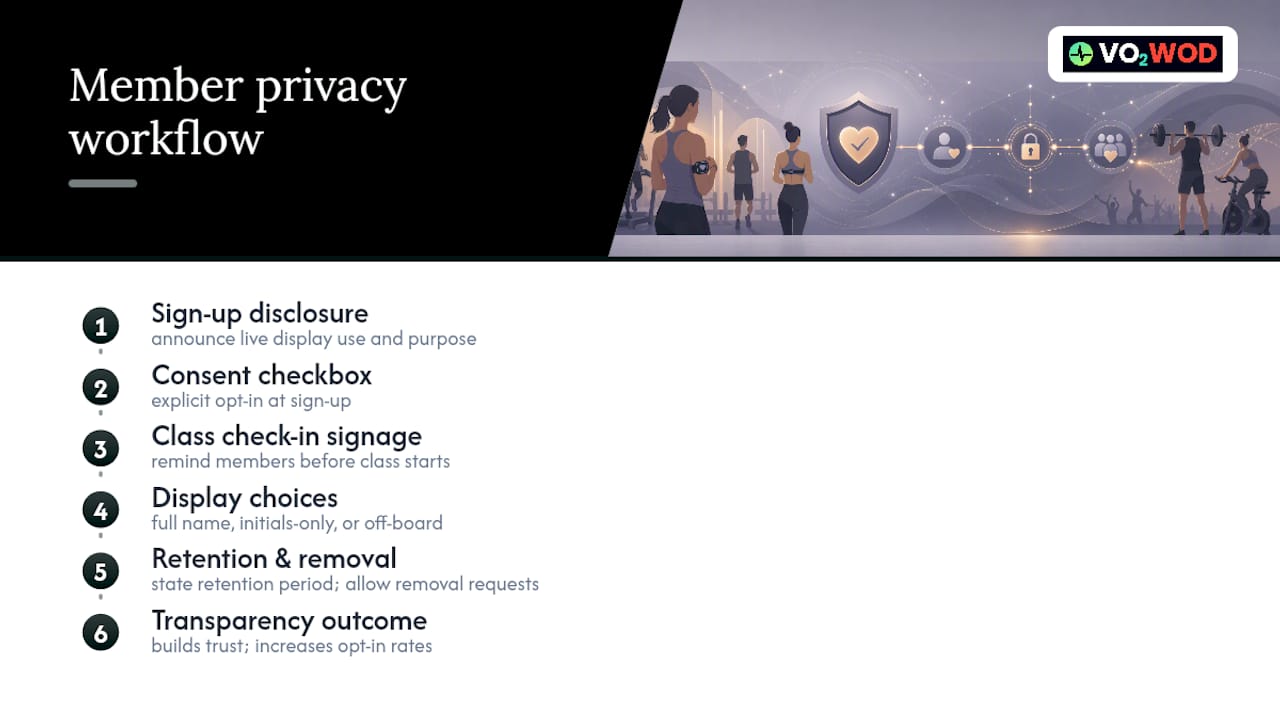
Make leaderboard participation opt-in, always. Offer an anonymous or initials-only mode for anyone who wants their zone visible without their name attached.
Disclose live display use at sign-up and again at class check-in, plus how long the data gets retained. A short policy checklist covers most of it: a consent checkbox at sign-up, signage at the front desk, and a clear process for members who want their data pulled from the display later. Handled this way, transparency becomes a trust builder, not a liability. Members who understand exactly what's shown and why tend to opt in more readily, not less.
Why an Integrated Platform Removes the Guesswork
Stitching together separate sensors, a receiver, and a display app works, but every extra piece is another failure point on class day. An integrated platform collapses that into one system: VO2WOD handles real-time monitoring and automatic workout scoring from the same member profiles that run your check-in and billing, while Vo2hub supplies the hardware side built to work with it out of the box.
The practical payoff shows up in onboarding, not just class time. One unified profile means a member's heart-rate data, scores, and attendance history live in the same record instead of three disconnected tools.
If you're weighing whether the investment pays off, run a small pilot: one cohort, four to six weeks, tracking attendance and time-in-zone before and after. Rework's wearable integration guide frames this kind of pilot tracking as the fastest way to build a real ROI case rather than guessing.
What I Learned Rolling Out Live Displays the Hard Way
Start opt-in, always. The gyms that force every member onto a leaderboard on day one lose the reluctant ones fast, and those are often the members who need the accountability most once they're comfortable.
Simplicity wins. A clean zone display beats a busy dashboard every time, because coaches need to glance and cue, not interpret. And reliability matters more than features: a receiver that pairs in three seconds flat, every class, will get more buy-in than a fancier system that hiccups once a week. The early win worth tracking isn't the tech itself. It's whether coaches start cuing to zones instead of guessing effort by watching faces.
— Marcus
Ready to Try Live Class Displays? Start With VO2WOD
Cobbling together a tablet, a third-party display app, and a box of loaner straps can work for a quick test, but it puts you in charge of troubleshooting every disconnect during class. An integrated hardware-software system gives functional-fitness gyms a single platform built specifically for live, multi-athlete heart-rate display, with scoring and member profiles synced instead of running through separate tools.
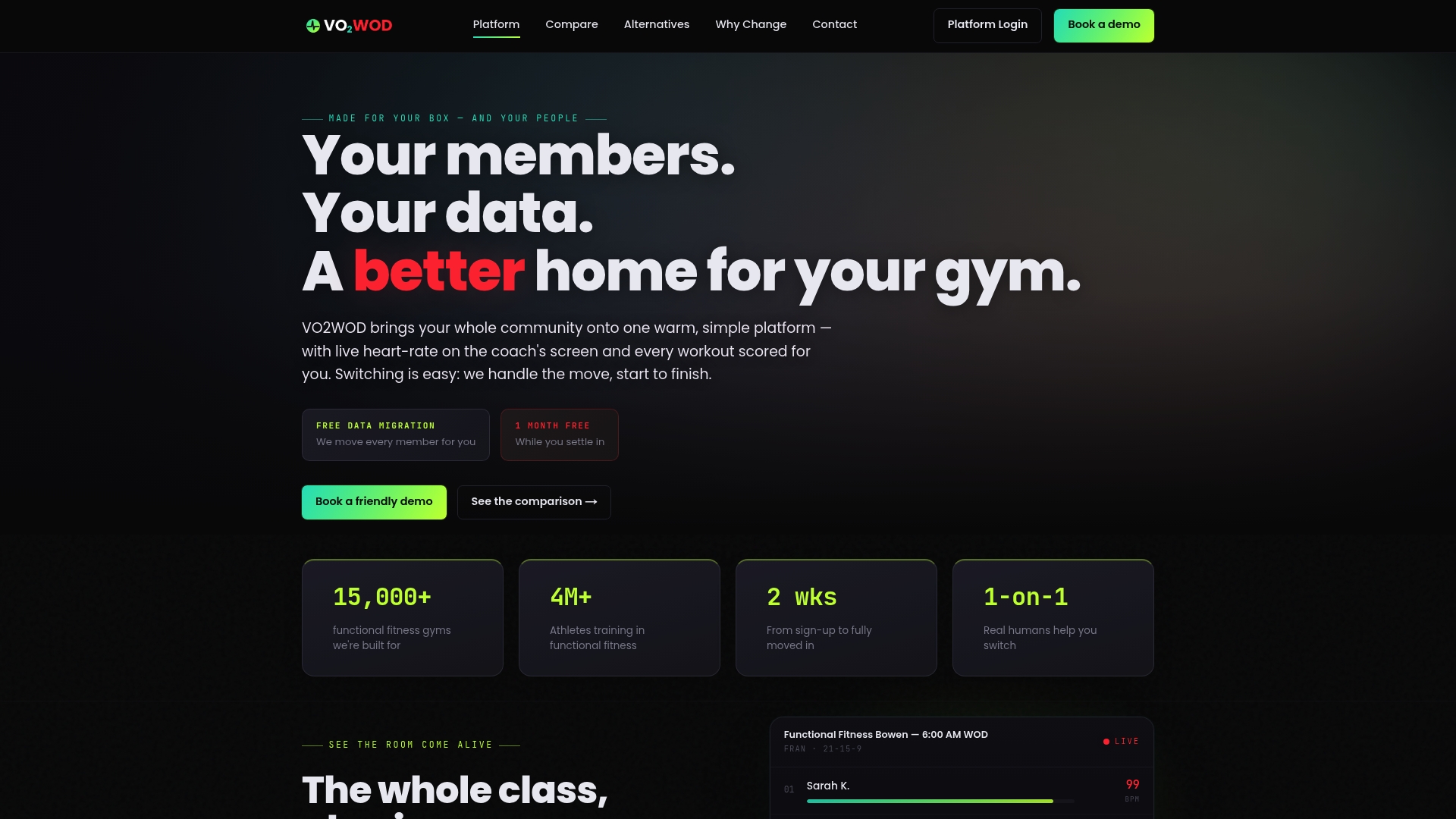
Switching over doesn't mean starting from scratch. VO2WOD includes free data migration, one month of complimentary service, and dedicated support to walk your team through setup class by class. If you're currently comparing platforms, the feature breakdown against other gym software shows where an integrated hardware and software approach saves setup time versus stitching one together yourself. Book a look at VO2WOD or check the Vo2hub hardware lineup to start a pilot in your next class block.
Sources
- How to integrate heart rate monitoring technology into your group | Skelcore
- Wearable Integration for Gyms: Heart Rate Tracking, Leaderboards & Partner Devices - 2025 Guide
- Mirroring Heart Rate Data to a TV Screen : Morpheus Coaching
FAQ
What Equipment Do I Need to Display Heart Rate on TV?
You need wearable sensors for each athlete, an aggregator or receiver to combine the signals, and display software that outputs to a screen via HDMI, AirPlay, or Chromecast. A studio receiver setup reduces pairing friction compared to connecting each device individually.
How Many Athletes Can One TV Screen Show at Once?
Some studio display systems cap a single screen at 18 tiles arranged three rows by six, then page through additional participants automatically once more people connect. Plan for paging speed if your classes regularly run larger than that.
Should Heart-Rate Leaderboards Be Mandatory for Members?
No. Leaderboards work best as opt-in, with anonymous or initials-only display modes for members who want their zone visible without their name attached. Disclosing this at sign-up and check-in builds trust rather than resentment.
Does VO2WOD Support Live Heart-Rate Display for Group Classes?
Yes, VO2WOD provides real-time heart-rate monitoring and automatic workout scoring built for functional-fitness group classes, paired with Vo2hub hardware for the display side. Pricing details are available directly on the VO2WOD site.
What Causes Bluetooth Dropout During Live Class Displays?
Dropout usually comes from distance between the sensor and aggregator or interference from metal equipment and thick walls. Moving the aggregator device closer to the training floor or switching to an external ANT+ receiver typically resolves it.